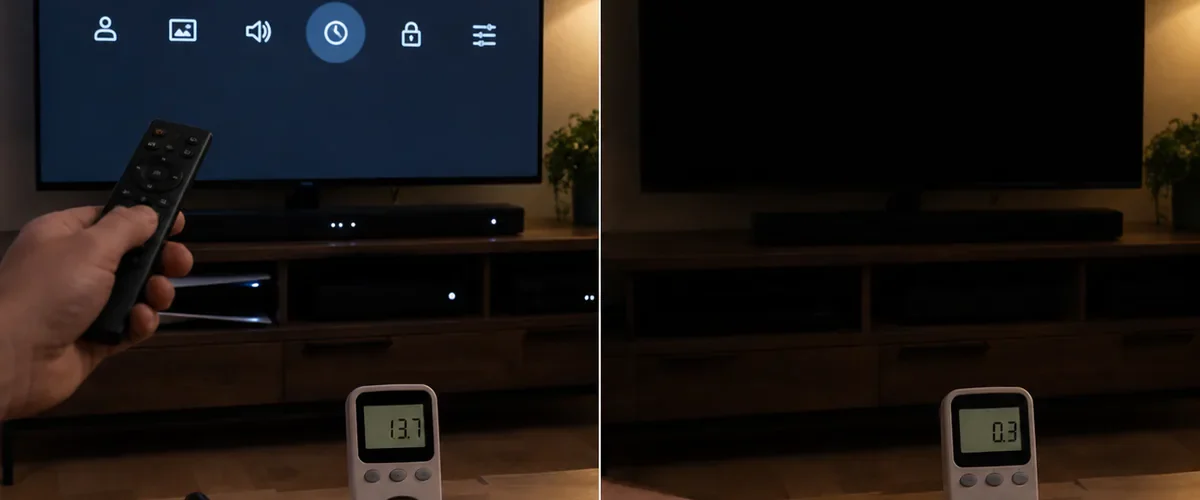
The television looks off. The screen is black, the room is quiet, and the remote is on the table. Yet a small part of the set may still be awake, listening for a voice command, a phone connection, or the signal that launches a picture in seconds.
That hidden setting is often called quick start, instant on, or network standby. It can use electricity all day for a feature you may barely notice. On an efficient modern TV, ordinary standby use is usually small. On some smart sets with extra wake features, however, the difference is worth checking.
The real mistake is not leaving one tiny red light glowing. It is never opening the energy menu at all.
Why an “Off” TV Still Uses Power
A television needs a little standby power so its remote can wake it. Smart models may also stay connected to Wi-Fi, check for updates, listen for a cast request, or wait for a voice assistant. Quick-start mode keeps more hardware ready so the home screen appears almost immediately.
Efficient televisions can keep basic standby very low. That means unplugging every newer set after each program may save only a modest amount. Quick-start and network features are the better targets because they may keep the TV in a more active state.
The Five-Minute Setting Check
Open the television’s settings and look under Power, Energy, Eco, General, or System. Manufacturers use different names, so read the short descriptions beside each option.
Turn off quick start or instant on if you do not mind waiting a few extra seconds. Disable voice wake, wake by mobile device, and always-ready casting if you never use them. Leave automatic software updates enabled if the TV cannot update safely while fully asleep; security matters more than a tiny saving.
Choose a Sensible Picture Mode
The largest energy use happens while the television is on. A showroom or vivid mode drives the backlight hard so the picture stands out beneath bright store lighting. At home, Standard, Cinema, Filmmaker, or an energy-saving mode is often more comfortable and uses less power.
Reduce brightness or backlight until whites still look clear without lighting the whole room. Do not crush the picture into darkness. The goal is a comfortable screen, not a contest for the lowest number.
Measure Before You Guess
A plug-in electricity meter gives the clearest answer for a television that connects directly to a wall outlet. Plug the meter into the outlet, connect the TV, and let the set settle in standby for at least several minutes. Record the watts.
Then change quick-start or network settings and measure again. To estimate yearly standby energy, multiply watts by the hours spent in standby each day, multiply by 365, and divide by 1,000. Multiply that number of kilowatt-hours by the rate on your power bill.
This simple calculation protects you from exaggerated savings claims. It may reveal a meaningful draw, or it may prove the TV is already efficient.
When a Power Strip Helps
A switched power strip can disconnect the television, game console, speakers, and streaming box together. Use one that is properly rated and certified for your country. Place it where the switch is easy to reach and never overload it.
Do not cut power while the TV is installing an update. Some recorders, cable boxes, and internet equipment also need continuous power for scheduled recordings or service. A smart strip is useful only when it matches the way the equipment works.
Common Mistakes That Waste More
Using a Screen Saver for Hours
A moving picture is still an active picture. Set an automatic sleep timer so the television turns off when no one is watching.
Leaving Consoles Running
A game console or computer connected to the television can use far more than the screen’s passive standby. Enable its sleep setting and check that background downloads are not keeping it active every night.
Buying a New TV Only to Save Standby Power
Replacing a working set has an upfront cost. Compare active-mode energy labels and expected yearly use when replacement is already needed. Do not assume a purchase will quickly pay for itself through standby savings alone.
Ignoring the Rest of the Entertainment Center
Measure the streaming box, soundbar, disc player, and console too. One accessory that never enters sleep mode can erase every careful television adjustment. Link sleep controls where possible, then confirm that each device actually shuts down after the selected idle period.
The Small Change That Keeps Working
Spend five minutes inside the power menu today. Turn off wake features you do not use, choose a calmer picture mode, and set a sleep timer. Measure the result if you want a real number.
The black screen was never the whole story. Once the hidden settings match your habits, the television can stop waiting so eagerly and your electricity use becomes easier to control.